/

Selected work

Amazon: AI-powered org planning

Enterprise · Agentic AI · 0–1

Amazon: AI-powered org planning

Enterprise · Agentic AI · 0–1

Role

Lead UX Designer

Role

Design, Engineering, Applied Science, Product

Role

Lead UX Designer

Timeline

6 months

Timeline

6 months

Timeline

6 months

Team

Product, Design, Engineering, Data Science

Team

Product, Design, Engineering, Data Science

Team

Product, Design, Engineering, Data Science

Scope

Research, System Design, Interaction Design

Scope

Research, System Design, Interaction Design

Scope

Research, System Design, Interaction Design

Impact

Shipped MVP; defined long-term vision and AI interaction patterns

Impact

Shipped MVP; defined long-term vision and AI interaction patterns

Impact

Shipped MVP; defined long-term vision and AI interaction patterns

Leaders flying blind in manual, slow, and fragmented org planning

Leaders flying blind in manual, slow, and fragmented org planning

Leaders flying blind in manual, slow, and fragmented org planning

The core challenge of this project wasn't designing an AI interface. It was defining the relationship between human judgment and AI in high-stakes organizational decisions.

Amazon processes hundreds of org changes monthly across its 320,000+ corporate employees. The process is manual, slow, and error-prone.

Each reorg takes HR Business Partners (HRBP) 4-16 weeks to reconcile data across HR and Finance systems. In parallel, leaders make decisions affecting thousands of employees without full context of cost, talent risk, or compliance.

When I joined, company strategy was to invest in an AI chat assistant for querying org data through natural language. I challenged this framing: before designing any interface, we needed to define where AI should augment human judgment and where it should stay out.

This shifted the project from chat interface to a system designed around human judgment, not AI automation.

The core challenge of this project wasn't designing an AI interface. It was defining the relationship between human judgment and AI in high-stakes organizational decisions.

Amazon processes hundreds of org changes monthly across its 320,000+ corporate employees. The process is manual, slow, and error-prone.

Each reorg takes HR Business Partners (HRBP) 4-16 weeks to reconcile data across HR and Finance systems. In parallel, leaders make decisions affecting thousands of employees without full context of cost, talent risk, or compliance.

When I joined, company strategy was to invest in an AI chat assistant for querying org data through natural language. I challenged this framing: before designing any interface, we needed to define where AI should augment human judgment and where it should stay out.

This shifted the project from chat interface to a system designed around human judgment, not AI automation.

The core challenge of this project wasn't designing an AI interface. It was defining the relationship between human judgment and AI in high-stakes organizational decisions.

Amazon processes hundreds of org changes monthly across its 320,000+ corporate employees. The process is manual, slow, and error-prone.

Each reorg takes HR Business Partners (HRBP) 4-16 weeks to reconcile data across HR and Finance systems. In parallel, leaders make decisions affecting thousands of employees without full context of cost, talent risk, or compliance.

When I joined, company strategy was to invest in an AI chat assistant for querying org data through natural language. I challenged this framing: before designing any interface, we needed to define where AI should augment human judgment and where it should stay out.

This shifted the project from chat interface to a system designed around human judgment, not AI automation.

Three research streams to define where AI belongs

Three research streams to define where AI belongs

Three research streams to define where AI belongs

I ran three research streams: contextual inquiry to understand current workflows, card sorting to map how people think about org changes, and concept testing to validate AI interaction models.
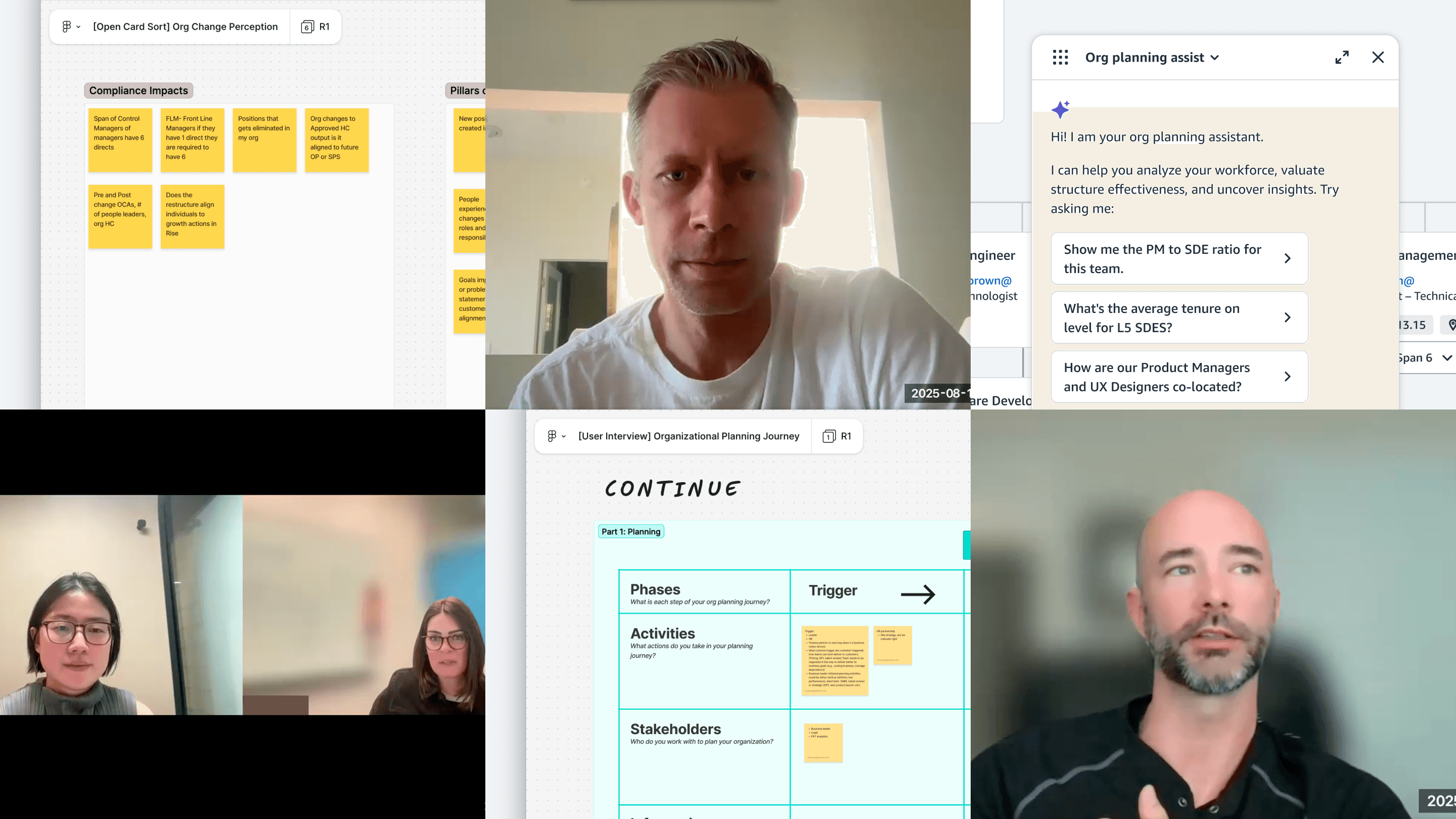
Interviews with HRBPs and leaders

Research findings that shaped AI boundaries

Research findings that shaped AI boundaries

Research findings that shaped AI boundaries

1.

HRBPs maintain shadow spreadsheets to manually calculate metrics no system provides: manager ratios, role composition, co-location rates.

Design implication: The data model must compute core planning metrics natively.
1.

HRBPs maintain shadow spreadsheets to manually calculate metrics no system provides: manager ratios, role composition, co-location rates.

Design implication: The data model must compute core planning metrics natively.

1.

HRBPs maintain shadow spreadsheets to manually calculate metrics no system provides: manager ratios, role composition, co-location rates.

Design implication: The data model must compute core planning metrics natively.

2.

Four dimensions consistently drive org change evaluation: work impact, cost impact, talent impact, and compliance.

Design implication: Impact analysis must focus on these four pillars. This applies to the data model, AI responses, and comparison views.

2.

Four dimensions consistently drive org change evaluation: work impact, cost impact, talent impact, and compliance.

Design implication: The data model must compute core planning metrics natively.

2.

Four dimensions consistently drive org change evaluation: work impact, cost impact, talent impact, and compliance.

Design implication: The data model must compute core planning metrics natively.

3.

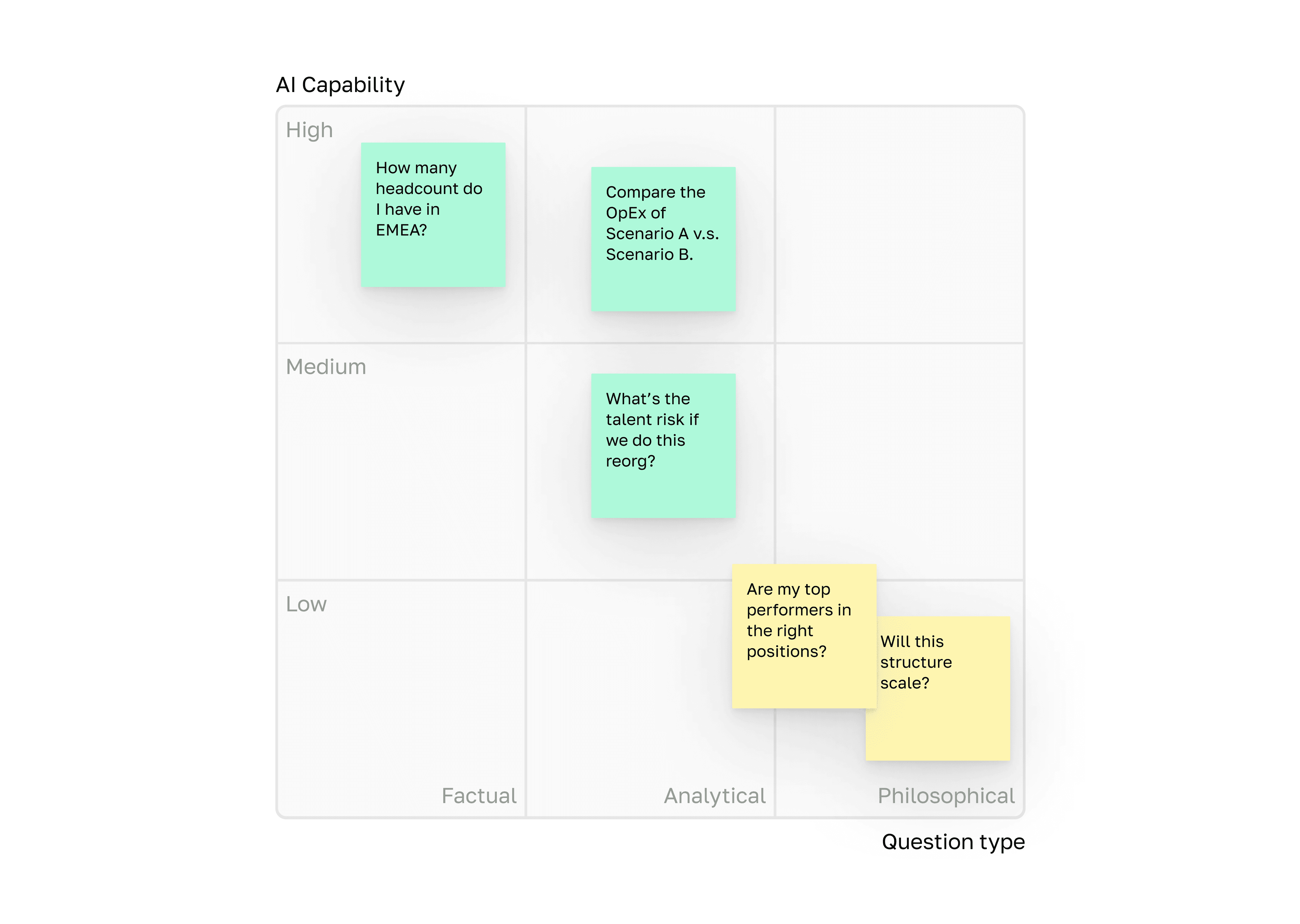
Leaders don't ask factual questions like "Show me senior engineers." They ask strategic ones: "Will this structure scale when we double next year?" These require judgment no system has.

Design implication: Classify question types and design AI to admit when a question needs human judgment, rather than hallucinate an answer.

3.

Leaders don't ask factual questions like "Show me senior engineers." They ask strategic ones: "Will this structure scale when we double next year?" These require judgment no system has.

Design implication: The data model must compute core planning metrics natively.

3.

Leaders don't ask factual questions like "Show me senior engineers." They ask strategic ones: "Will this structure scale when we double next year?" These require judgment no system has.

Design implication: The data model must compute core planning metrics natively.

Mapping of question types to AI capability

Designing the data model AI reasons over
Designing the data model AI reasons over

Designing the data model AI reasons over

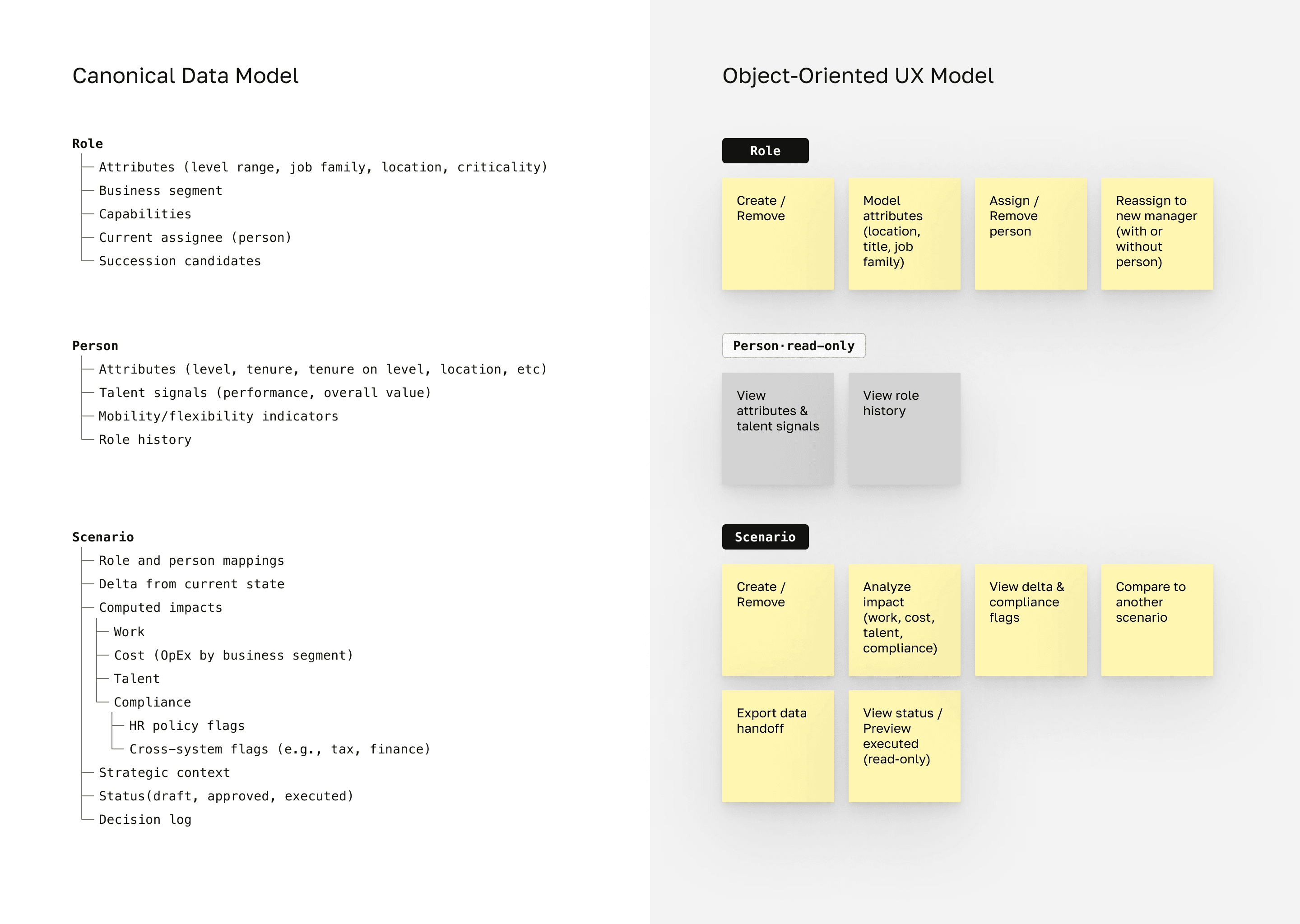
Without the right data structure, AI can't answer even simple questions reliably. If manager ratios aren't computed natively, AI can't flag when a proposed change breaks span-of-control targets. The data model is the backbone of the product.

I mapped core objects and user actions, then worked with engineering to translate these into a canonical data model the AI can reason over.


Key design decisions in the data model:

  • Role as first-class entity

  • Computed metrics

  • Four-pillar impact structure (work, cost, talent, and compliance)

  • Scenario as container

Without the right data structure, AI can't answer even simple questions reliably. If manager ratios aren't computed natively, AI can't flag when a proposed change breaks span-of-control targets. The data model is the backbone of the product.

I mapped core objects and user actions, then worked with engineering to translate these into a canonical data model the AI can reason over.


Key design decisions in the data model:

  • Role as first-class entity

  • Computed metrics

  • Four-pillar impact structure (work, cost, talent, and compliance)

  • Scenario as container

Without the right data structure, AI can't answer even simple questions reliably. If manager ratios aren't computed natively, AI can't flag when a proposed change breaks span-of-control targets. The data model is the backbone of the product.

I mapped core objects and user actions, then worked with engineering to translate these into a canonical data model the AI can reason over.


Key design decisions in the data model:

  • Role as first-class entity

  • Computed metrics

  • Four-pillar impact structure (work, cost, talent, and compliance)

  • Scenario as container

Simplified model. The actual schema is more complex, reflecting legacy system constraints and ongoing migrations.

How should AI act when it receives questions it can't answer reliably?

How should AI act when it receives questions it can't answer reliably?

How should AI act when it receives questions it can't answer reliably?

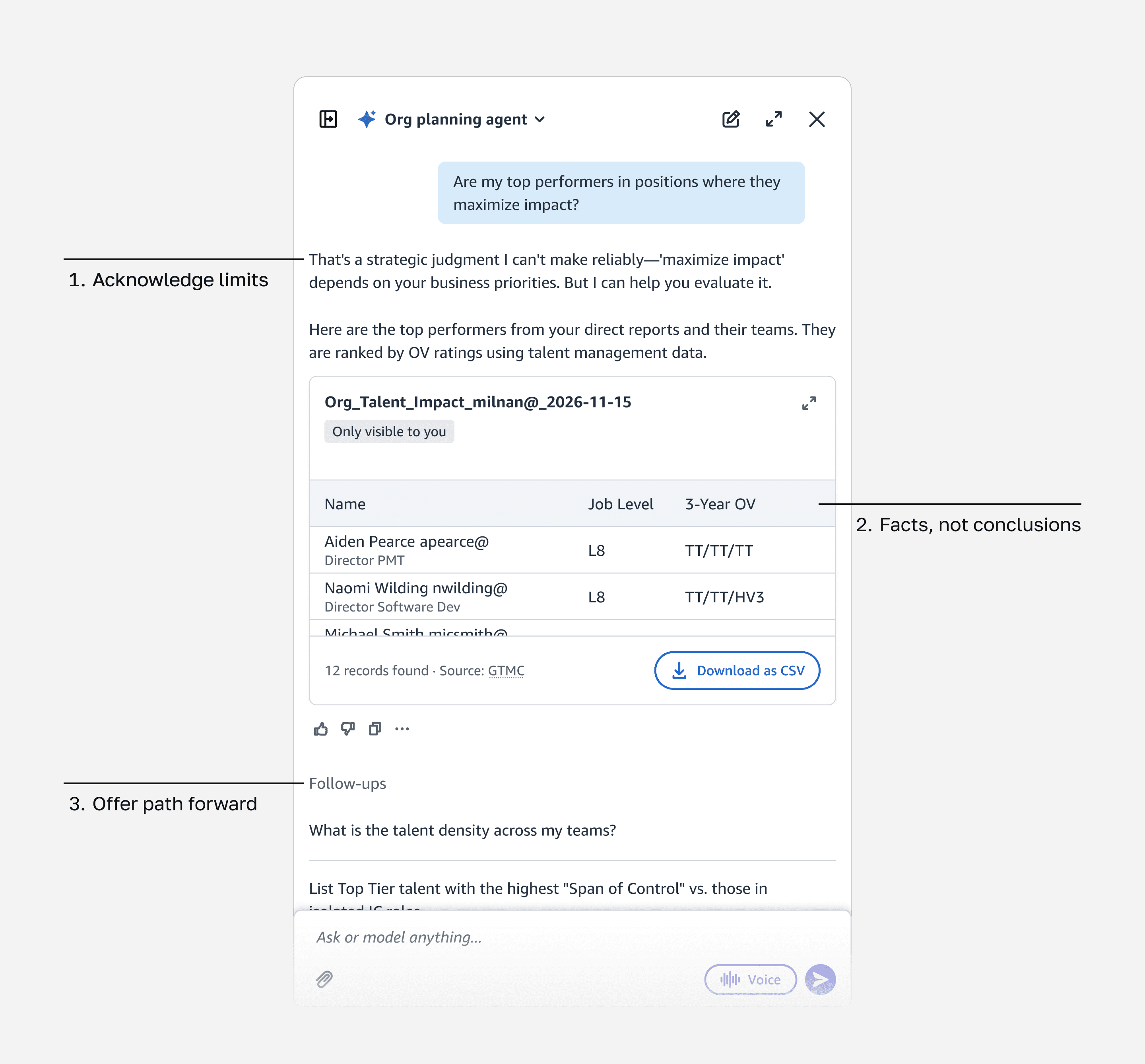
The most important pattern I designed was the AI Pivot pattern: what happens when users ask questions AI can't reliably answer.

For example, if a user asks, "Are my top performers in roles where they make the most impact?" the AI won't attempt to answer directly. Instead, it acknowledges the question requires judgment, surfaces relevant data, and lets the user draw their own conclusion.

Design principles:

  1. Acknowledge the question's nature: Don't pretend the question can be answered if it can’t

  2. Provide user with the facts, not conclusions: This way, they can make their own judgement

  3. Offer paths forward: Suggest what AI can assist with next

Trust comes from honesty about limits, not from having all the answers.
Trading off real-time for on-demand AI analysis

Trading off real-time for on-demand AI analysis

Trading off real-time for on-demand AI analysis

Original design

As users drag roles and change assignments, the system shows compliance risks, ratio impacts, and cost changes in real time.

Original design

As users drag roles and change assignments, the system shows compliance risks, ratio impacts, and cost changes in real time.

Original design

As users drag roles and change assignments, the system shows compliance risks, ratio impacts, and cost changes in real time.

What we shipped

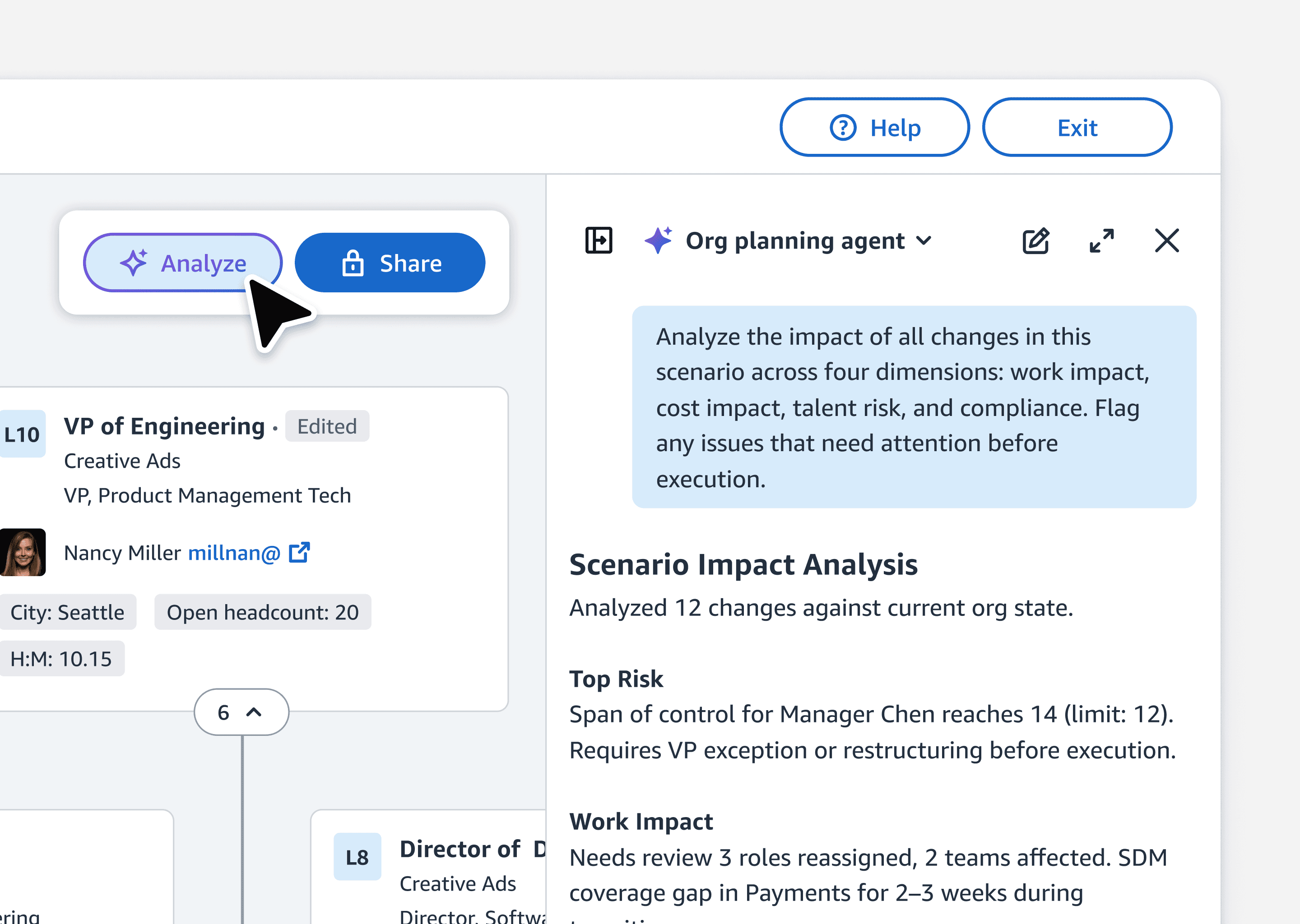
Users build scenarios freely, then invoke AI analysis when ready.

What we shipped

Users build scenarios freely, then invoke AI analysis when ready.

What we shipped

Users build scenarios freely, then invoke AI analysis when ready.

Why we shifted

Real-time alerts that don't match what users want create noise. No one wants a Clippy announcing findings mid-thought. For v1, we made analysis on-demand.

Why we shifted

Real-time alerts that don't match what users want create noise. No one wants a Clippy announcing findings mid-thought. For v1, we made analysis on-demand.

Why we shifted

Real-time alerts that don't match what users want create noise. No one wants a Clippy announcing findings mid-thought. For v1, we made analysis on-demand.

What we preserved

Analysis structured around four pillars. We aligned to revisit real-time if a strong business case emerges.
What we preserved

Analysis structured around four pillars. We aligned to revisit real-time if a strong business case emerges.

What we preserved

Analysis structured around four pillars. We aligned to revisit real-time if a strong business case emerges.

On-demand analysis: users click Analyze when ready

Reduced decision-making time with the MLP rollout
Reduced decision-making time with the MLP rollout

Reduced decision-making time with the MLP rollout

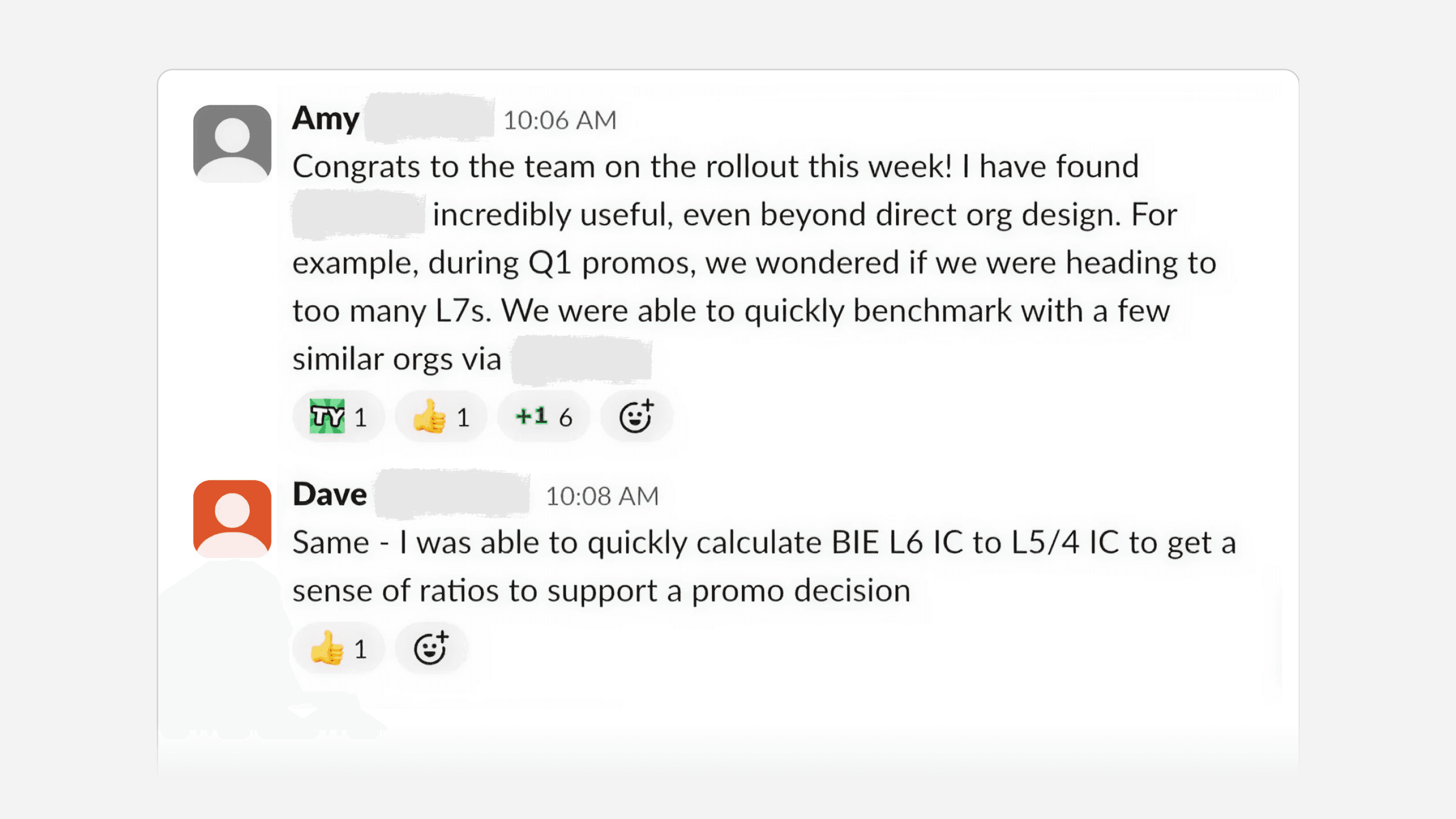
The minimal lovable product (MLP) is now available to all L7+ Amazonians, with about 1,000 weekly active users across HR professionals and senior management.

HRBPs report quicker restructuring decisions and far less time gathering data across separate systems.

Beyond AI analysis, v1 also shipped scenario planning, data visualizations, and collaboration features to support the full restructuring workflow. For v2, I scoped real-time analysis during scenario building and deeper integration with execution workflows like approvals and compliance routing.

The minimal lovable product (MLP) is now available to all L7+ Amazonians, with about 1,000 weekly active users across HR professionals and senior management.

HRBPs report that seeing analysis in org chart context, instead of assembling data from separate systems, helps them make faster restructuring decisions.

What shipped in v1:

  • Scenario-based org planning with drag-and-drop role assignment

  • On-demand AI analysis across four dimensions: work, cost, talent, and compliance

  • Sharing and annotation to support collaborative decision-making

Directions I scoped for v2:

  • Real-time analysis as users build scenarios

  • Expanded AI capability into strategic question types, guided by the capability spectrum framework

  • Deeper integration with execution workflows like approvals, backfill triggers, and compliance routing

User feedback after rollout

Designing with AI means defining the relationship between human and AI

Designing with AI means defining the relationship between human and AI

Designing with AI means defining the relationship between human and AI

This was my first project designing non-deterministic experiences. Researching users' mental models and their HR artifacts helped me see what drives planning decisions and what data the system must provide. It also revealed a key challenge: in enterprise settings, AI behavior needs to be traceable and consistent. Leaders won't act on a recommendation they can't explain to their stakeholders, or one that gives a different answer each time.

This led us to design what I think of as a code of conduct for the AI, the same way you'd expect a senior employee to operate within clear boundaries and communicate with structure. The capability spectrum defines where AI should and shouldn't weigh in. The structured four-pillar analysis evaluates every scenario through the same framework.

What made this project different is that I wasn't designing flows. I was defining the relationship between human and AI.

This was my first project designing non-deterministic experiences. Researching users' mental models and their HR artifacts helped me see what drives planning decisions and what data the system must provide. It also revealed a key challenge: in enterprise settings, AI behavior needs to be traceable and consistent. Leaders won't act on a recommendation they can't explain to their stakeholders, or one that gives a different answer each time.

This led us to design what I think of as a code of conduct for the AI, the same way you'd expect a senior employee to operate within clear boundaries and communicate with structure. The capability spectrum defines where AI should and shouldn't weigh in. The structured four-pillar analysis evaluates every scenario through the same framework.

What made this project different is that I wasn't designing flows. I was defining the relationship between human and AI.

This was my first project designing non-deterministic experiences. Researching users' mental models and their HR artifacts helped me see what drives planning decisions and what data the system must provide. It also revealed a key challenge: in enterprise settings, AI behavior needs to be traceable and consistent. Leaders won't act on a recommendation they can't explain to their stakeholders, or one that gives a different answer each time.

This led us to design what I think of as a code of conduct for the AI, the same way you'd expect a senior employee to operate within clear boundaries and communicate with structure. The capability spectrum defines where AI should and shouldn't weigh in. The structured four-pillar analysis evaluates every scenario through the same framework.

What made this project different is that I wasn't designing flows. I was defining the relationship between human and AI.

Thanks for stopping by ㋡.

Minshuo Tang © 2026

Thanks for stopping by ㋡.

Minshuo Tang © 2026

Thanks for stopping by ㋡.

Minshuo Tang © 2026